

Please note this page may contain affiliate links that support us to do what we do best. We only partner with products and services we love. You can read our Affiliate Disclaimer for more information.
Free Downloadable Travel Itinerary
I honestly do not know what I would do without Google Drive. It really does allow me to work from anywhere and have access to important documents in no time at all. That’s why I love using it for making travel itineraries.
I like to keep it simple, below are the basic steps I follow when making any itinerary.
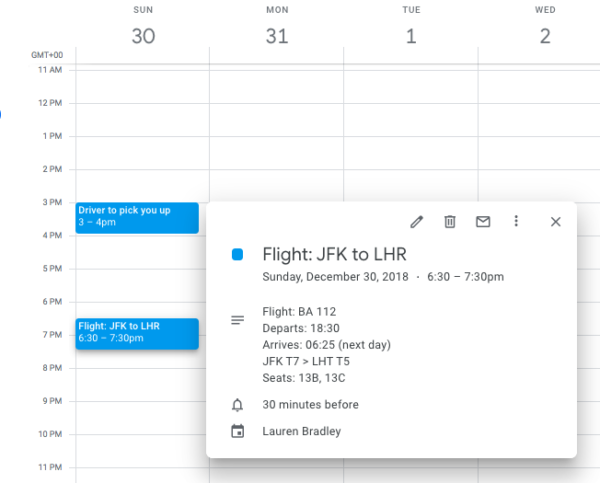
- I’m not a big fan of wasting paper if it can be helped so I first enter all the details into the diary.
- I then use Google Sheets to create the itinerary, later downloading it as a PDF once complete.
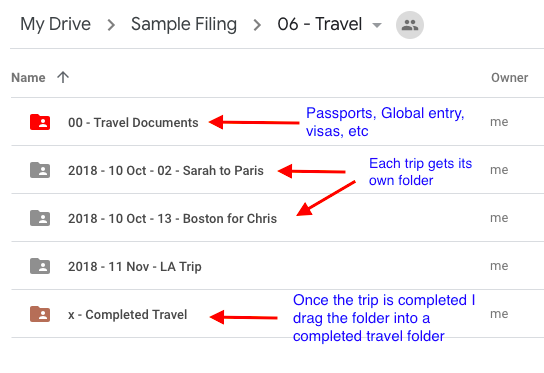
- I keep a Travel folder in Google Drive and then put each trip within that folder. Once the trip is over I move it to an archive folder.
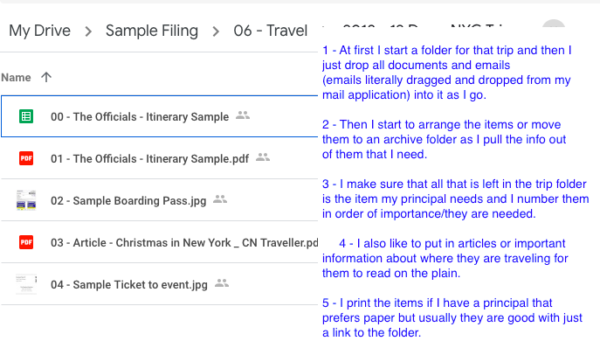
That’s just about it. I’ve included some screenshots below of how I organize things. Scroll down to get access to the sample trip folder.
The first item “00 – The Officials – Itinerary Sample” Google Sheet is itinerary. I do this so that my principal can see the draft and comment if needed.
The second item “01 – The Officials – Itinerary Sample” is the same itinerary just saves as a PDF. This is simply the final draft, easier to read without the gridlines.
The rest of the items are just samples of things I usually include.
I hope you enjoy the itinerary. Happy travels!